> For the complete documentation index, see [llms.txt](https://docs.ixhello.com/llms.txt). Markdown versions of documentation pages are available by appending `.md` to page URLs; this page is available as [Markdown](https://docs.ixhello.com/ixhc/blueprints/alexa-skill-using-blueprints.md).
# Alexa Skill using Blueprints
### Objective
This document demonstrates how to build an Alexa skill from a Blueprint.
### Steps
1. Create Alexa skill from Blueprint
2. Publish to Alexa
3. Test the skill
### Create Alexa Skill from Blueprint
1. Open Studio Mode of ixHello.
2. On the left-hand side, expand **Apps** and then click on **App Blueprints**
3. Scroll down and locate the Time Off Request Assistant. Press **Create App**
4. Enter an **App Name** and **Description**. The Selected Template value was determined by the Blueprint.
5. Press **Create App**. The process has 3 steps. These steps allow the user to customize the content of their app and entity types. Content can be text, files, multimedia like images, video and APL content.
6. The first step looks for shared content. If another app has already been created from this template, files will be listed. Unless other app developers have modified these files, select **Yes**.
7. The second screen displays similar warnings. Press **Next**
8. Click **Submit** on the final step.
9. Publishing an app to Amazon Alexa means that you can now access the app that you just created from your Alexa account. Press **Publish App**. No customization will be done.
### Publish skill to Alexa
1. The App Publishing page will open. The new App appears on three rows so it can be published to multiple supported channels. We are going to publish the skill to Amazon Alexa.
2. Click on the ellipses on the right side of the Alexa row and select **Publish to Alexa**
3. The Publish App to Amazon Alexa page appears. Under Select Amazon Account (LWA), a dropdown will appear with previously created Amazon Alexa accounts. Select the desired account and press **Publish to Alexa**.
1. A Congratulations message will appear. Press **Done** to close the window.
### Test the Skill using Simulator
1. To test the skill using simulator, click **Go to Alexa Skill**.
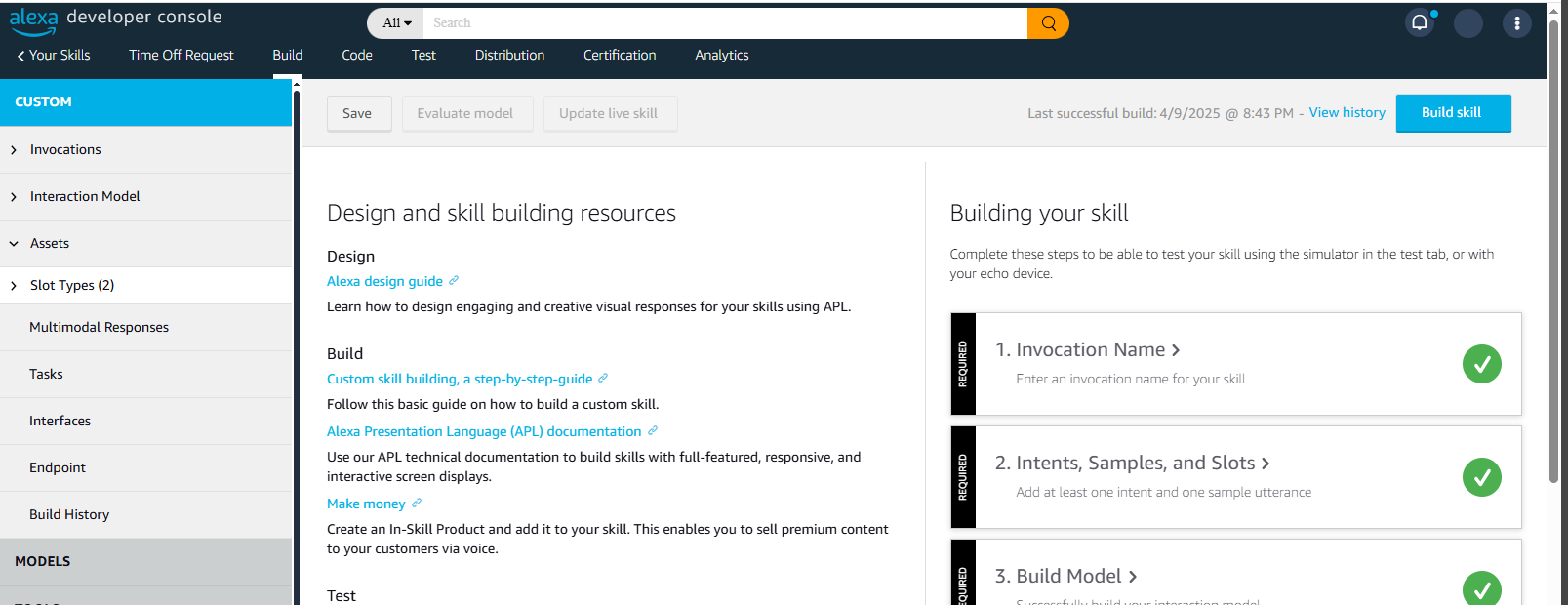
2. The Amazon Alexa Developer Console will open.
3. To enable the microphone, click **Test** from the top menu.
4. A microphone option window will appear. Select **Allow while visiting this site**.
5. Turn testing on by clicking on Off and selecting **Development**.
6. On the left hand side of the upper menu, select **Your Skills**
7. A list of Alexa Skills appears. Locate the Time Off Request skill, open the Choose Action dropdown list, and select **Test**
8. An Alexa Simulator opens. Test the skill by typing **request time off** to start the skill.
9. Enter a time off request.f
10. You can say “Goodbye” to exit the skill.
**Congrats, you can now use the skill from any Alexa enabled devices.**
---
# Agent Instructions
This documentation is published with GitBook. GitBook is the documentation platform designed so that both humans and AI agents can read, navigate, and reason over technical content effectively. Learn more at gitbook.com.
## Querying This Documentation
If you need additional information that is not directly available in this page, you can query the documentation by asking a question.
Perform an HTTP GET request on the following URL with the `ask` and `goal` query parameters:
```
GET https://docs.ixhello.com/ixhc/blueprints/alexa-skill-using-blueprints.md?ask=&goal=
```
`ask` is the immediate question: it should be specific, self-contained, and written in natural language.
`goal` is what the user is ultimately trying to achieve, the reason they need the answer. Sharing it helps GitBook give you a better, more relevant answer. A goal is most helpful when it describes the outcome the user wants rather than restating the question. For example, with `ask=how do I create an API token`, a goal like `automate deployments from our CI pipeline` lets GitBook tailor the answer to that use case.
The response will contain a direct answer to the question and relevant excerpts and sources from the documentation.
Use this mechanism when the answer is not explicitly present in the current page, you need clarification or additional context, or you want to retrieve related documentation sections.