> For the complete documentation index, see [llms.txt](https://docs.ixhello.com/llms.txt). Markdown versions of documentation pages are available by appending `.md` to page URLs; this page is available as [Markdown](https://docs.ixhello.com/ixhc2/administration/phone-number-lifecycle-management.md).
# Phone Number Lifecycle Management
### Overview
* Phone Number Lifecycle Management provides a centralized way to reserve, assign, monitor, and release phone numbers within the Admin UI.
* It enables users to reserve numbers from a shared Concentrix number pool, assign them to voice flows, and manage phone number-to-flow associations throughout their lifecycle.
* The feature also includes lifecycle monitoring and visual health indicators to help administrators quickly identify the status of a phone number based on its usage and activity:
* Yellow: Indicates a phone number that is inactive or approaching an attention threshold and may require review.
* Red: Indicates a phone number that has remained unused beyond the defined threshold and may be a candidate for reassignment or release.
This helps administrators efficiently manage phone number inventory, optimize resource utilization, and maintain operational visibility.
***
### What Problem It Solves
1. **Replaces siloed number reservation**
* Eliminates organization-specific number reservation models that are difficult to manage in multi-organization environments.
* Provides a centralized and scalable approach to voice number management across the platform.
2. **Enables self-service for flow builders**
* Allows builders to reserve and manage voice numbers directly within the platform.
* Reduces dependency on support teams and speeds up voice deployment.
3. **Improves operational control**
* Gives administrators a centralized view of all voice numbers and their assignment status.
* Tracks the Last Call timestamp to support monitoring, reassignment, and lifecycle management decisions.
4. **Prevents assignment conflicts**
* Prevents users from assigning a voice number that is already in use.
* Blocks the deletion of flows that still have active number assignments, helping maintain service continuity and configuration integrity.
***
### Why use Phone Number Lifecycle Management
1. Supports multi-org number management
* Eliminates the siloed reservation model that breaks down across organizations.
2. Accelerates voice deployments
* Gives flow builders self-service access to reserve and assign numbers.
3. Improves visibility
* Provides administrators with operational insight through:
* Assignment status
* Last Call data
* Visual health indicators
4. Reduces errors
* Prevents invalid actions such as:
* Reusing a number that is already assigned
* Deleting a flow that still has an active number mapping
***
### Feature goals
1. **Centralized Pool Management**
* Provide a searchable and filterable view of all available numbers.
* Support number discovery by types such as:
* Area code
* Toll-free
2. **Flow-to-Number Mapping**
* Support mapping between reserved numbers and voice flows.
* Allow assignment management with built-in guardrails.
3. **Operational Visibility**
* Show usage data such as Last Call.
* Surface health indicators to help administrators identify stale or at-risk numbers.
4. **Conflict Prevention**
* Prevent invalid actions such as:
* Reassigning in-use numbers incorrectly
* Deleting actively assigned flows
***
### Systems involved
1. **Platform scope**
* According to the JIRA description, this feature spans multiple IXHV platform components:
* Admin System
* Channel Gateway System
* Configuration System
* Runtime Engine System
2. **What this means for users**
* Although users primarily interact through the Admin UI and Flow Editor, the feature depends on platform-wide coordination for:
* Number availability
* Flow assignment
* Runtime usage tracking
* Lifecycle monitoring
***
### How the feature works
1. **Centralized Phone Number Pool**
* Browse a shared Concentrix pool of available phone numbers from a single location.
* Use built-in search and filtering options to quickly find numbers that meet your requirements.
2. **Reservation Model**
* Reserve a phone number directly from the shared pool.
* Once reserved, the number is removed from the shared inventory and becomes available exclusively within your organization.
* This ensures organizations can manage their assigned numbers independently while maintaining centralized governance.
3. **Flexible Number Assignment**
* Assign a reserved phone number to a voice flow.
* Start the assignment process from either:
* Number View: Assign a flow while managing phone numbers.
* Flow View: Select and assign a phone number while configuring a voice flow.
4. **Assignment Guardrails**
* Displays only reserved, unassigned phone numbers when assigning a number to a flow.
* Prevents duplicate assignments and helps avoid configuration conflicts.
* Ensures each phone number is associated with only one active flow at a time.
5. **Lifecycle Monitoring**
* Tracks the Last Call timestamp for every reserved phone number.
* Provides visibility into recent number activity to support monitoring and lifecycle management.
* Helps administrators identify inactive numbers and make informed reassignment or cleanup decisions.
***
### User workflow
#### 1. Reserve and manage Phone Numbers
Login to the Customer v2 interface, select Reserve a New Number.
Browse the shared pool of available phone numbers.
Use search and filtering options to locate a suitable number.
* Common filters include:
* Area code
* Toll-free numbers
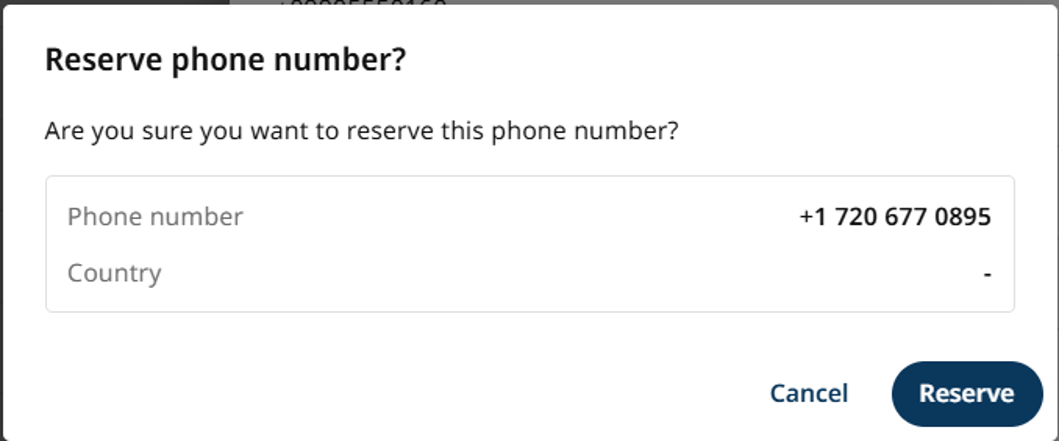
Select the desired number and click **Reserve**.
Once reserved:
* The number becomes available for use within your organization.
* It is added to your organization's Reserved Numbers list.
Use the Reserved Numbers page to monitor:
* Assignment status
* Last Call timestamp
#### 2. Monitor Number Lifecycle
The platform tracks a Last Call timestamp for every reserved phone number.
This information helps administrators:
* Monitor number activity.
* Identify inactive or underutilized numbers.
* Make informed decisions about reassignment and lifecycle management.
#### 3. Assign a Phone Number to a Flow
You can assign a reserved phone number to a voice flow from either location:
**From Number View**
Select a reserved phone number.
Choose the voice flow you want to associate with the number.
**From Flow Editor**
Open the voice flow.
Select **Assign Number**.
Choose a reserved phone number from the available list.
{% hint style="info" %}
**Note:** Only reserved phone numbers that are not currently assigned to a flow are available for selection.
{% endhint %}
#### 4. Reassign or Unassign Phone Numbers
To update existing number-to-flow mappings, you can:
* Unassign a phone number from its current flow.
* Reassign a flow to a different reserved phone number.
This provides flexibility when updating routing configurations or managing number usage.
#### 5. Release a Phone Number
Flow publishers can release reserved phone numbers that are no longer needed. Releasing a number returns it to the global pool of available phone numbers, making it available for reservation by other organizations.
* Select Release Phone Number to release a reserved number.
* A confirmation prompt appears before the release is completed.
* Once released, the phone number is removed from your organization's reserved numbers list and returned to the global available number pool.
{% hint style="info" %}
**Important:** Phone numbers that are currently assigned to a flow cannot be released.
{% endhint %}
To release an assigned phone number:
1. Unassign the phone number from the flow.
2. Return to the phone number details or management view.
3. Select Release Phone Number.
4. Confirm the action to return the number to the global pool.
This safeguard helps prevent accidental disruption of active voice flows and ensures that phone numbers are only released when they are no longer in use.
#### 6. Deletion Safeguards
To prevent accidental service disruptions, flows with active phone number assignments cannot be deleted.
* The Delete option is disabled for flows that have an assigned phone number.
* A tooltip explains that the phone number must be unassigned before the flow can be deleted.
***
### Reservation behavior
1. Shared pool access
* Numbers come from a shared Concentrix-managed pool.
2. Org-level availability after claim
* Once reserved, a number is available to the reserving user’s organization.
3. Centralized discovery
* Users can search and filter numbers before reserving them.
***
### Conflict prevention and guardrails
1. Prevent number reuse issues
* The system only allows assignment from numbers that are:
* Reserved
* Currently unassigned
2. Prevent invalid flow deletion
* If a flow is actively assigned to a number:
* Deletion is disabled
* The user is told to unassign the number first
3. Improve flow integrity
* These guardrails reduce the risk of breaking live or configured voice routing accidentally.
---
# Agent Instructions
This documentation is published with GitBook. GitBook is the documentation platform designed so that both humans and AI agents can read, navigate, and reason over technical content effectively. Learn more at gitbook.com.
## Querying This Documentation
If you need additional information that is not directly available in this page, you can query the documentation by asking a question.
Perform an HTTP GET request on the following URL with the `ask` and `goal` query parameters:
```
GET https://docs.ixhello.com/ixhc2/administration/phone-number-lifecycle-management.md?ask=&goal=
```
`ask` is the immediate question: it should be specific, self-contained, and written in natural language.
`goal` is what the user is ultimately trying to achieve, the reason they need the answer. Sharing it helps GitBook give you a better, more relevant answer. A goal is most helpful when it describes the outcome the user wants rather than restating the question. For example, with `ask=how do I create an API token`, a goal like `automate deployments from our CI pipeline` lets GitBook tailor the answer to that use case.
The response will contain a direct answer to the question and relevant excerpts and sources from the documentation.
Use this mechanism when the answer is not explicitly present in the current page, you need clarification or additional context, or you want to retrieve related documentation sections.