> For the complete documentation index, see [llms.txt](https://docs.ixhello.com/llms.txt). Markdown versions of documentation pages are available by appending `.md` to page URLs; this page is available as [Markdown](https://docs.ixhello.com/ixhc2/draft-and-publish-lifecycle-for-flows.md).
# Draft & Publish Lifecycle for Flows
## Overview
The Draft & Publish Lifecycle introduces a controlled release process for flows in iX Hello. Flow builders can now safely create, edit, test, and save changes without affecting live customer interactions. A flow only becomes available to live traffic after it has been explicitly published.
This separation between drafting and publishing provides greater control, safer deployments, improved governance, and better version management.
***
## Why This Feature Matters
Prior to this enhancement, saving a flow could immediately impact runtime behavior. This made it difficult to safely test changes, coordinate releases, or prevent incomplete work from affecting customers.
With the Draft & Publish model:
* Editing and deployment are separate activities.
* Flow builders can safely work on new changes.
* Live traffic remains unaffected until a version is published.
* Teams gain greater visibility into what is live and what is still under development.
* Publishers can manage production releases with confidence.
***
## Understanding Flow Versions
Every flow now maintains two key versions:
### Draft Version
The draft version is the current working copy of the flow.
Characteristics:
* Used by flow builders to make changes.
* Updated whenever a flow is saved.
* Not used for live customer interactions.
* Can continue evolving independently of the published version.
***
### Published Version
The published version is the flow currently serving live traffic.
Characteristics:
* Used by chat widgets, voice channels, and runtime sessions.
* Remains unchanged during ongoing development.
* Only changes when a user publishes a version.
* Represents the production-ready release of the flow.
***
### Current Version
The current version represents the latest saved version of the flow.
The current version may:
* Match the published version.
* Be ahead of the published version if additional changes have been saved.
The Designer clearly indicates when the current version is newer than the published version.
***
### Immutable Versions
Each saved version becomes a permanent snapshot.
Once a version is created:
* It cannot be modified.
* It remains available in version history.
* It can be tested independently.
* It can be republished later if needed.
This provides better auditability and release management.
***
## How the Draft & Publish Model Works
### Saving Changes
When a builder edits a flow and clicks **Save**:
* A new version is created.
* The draft/current version is updated.
* Live traffic remains unaffected.
#### Example
| Action | Result |
| ------------------------------- | ----------------------------------- |
| Flow version 1.0.3 is published | Live traffic uses 1.0.3 |
| Builder edits and saves | Version 1.0.4 becomes current draft |
| No publish occurs | Live traffic continues using 1.0.3 |
Saving alone does not make a version live.
***
### Publishing a Flow
Publishing is the action that makes a version available to live traffic.
When a version is published:
* The Published Pointer moves to that version.
* All new sessions use that version.
* Existing sessions continue using the version they started with.
***
## Runtime Behavior
### Live Traffic Uses the Published Version
Channels such as:
* Chat Widgets
* Voice Calls
* Headless Flow Sessions
always use the published version by default.
***
### What Happens During an Active Session?
Sessions resolve their version when they start.
If a publish occurs while a session is in progress:
#### Existing Sessions
* Continue executing the original version.
* Are not interrupted.
* Do not switch versions midway.
#### New Sessions
* Use the newly published version.
#### Example
| Time | Event |
| ------------- | ------------------------------------- |
| 10:00 AM | Customer call starts on version 1.0.3 |
| 10:05 AM | Version 1.0.4 is published |
| Existing call | Continues on 1.0.3 |
| New calls | Use 1.0.4 |
This ensures predictable runtime behavior.
***
## Creating and Managing Versions
### Step 1: Create or Edit a Flow
1. Open a flow in Designer.
2. Make the required changes.
3. Click Save.
A new version is created automatically.
***
### Step 2: Validate the Flow
Flows can be saved even if validation errors exist.
However:
Invalid versions can be saved.
Invalid versions cannot be published.
This prevents broken flows from reaching production.
***
### Step 3: Test the Draft
Before publishing, builders can test:
* The current draft version
* The published version
* Any previous version
This allows teams to validate behavior before release.
***
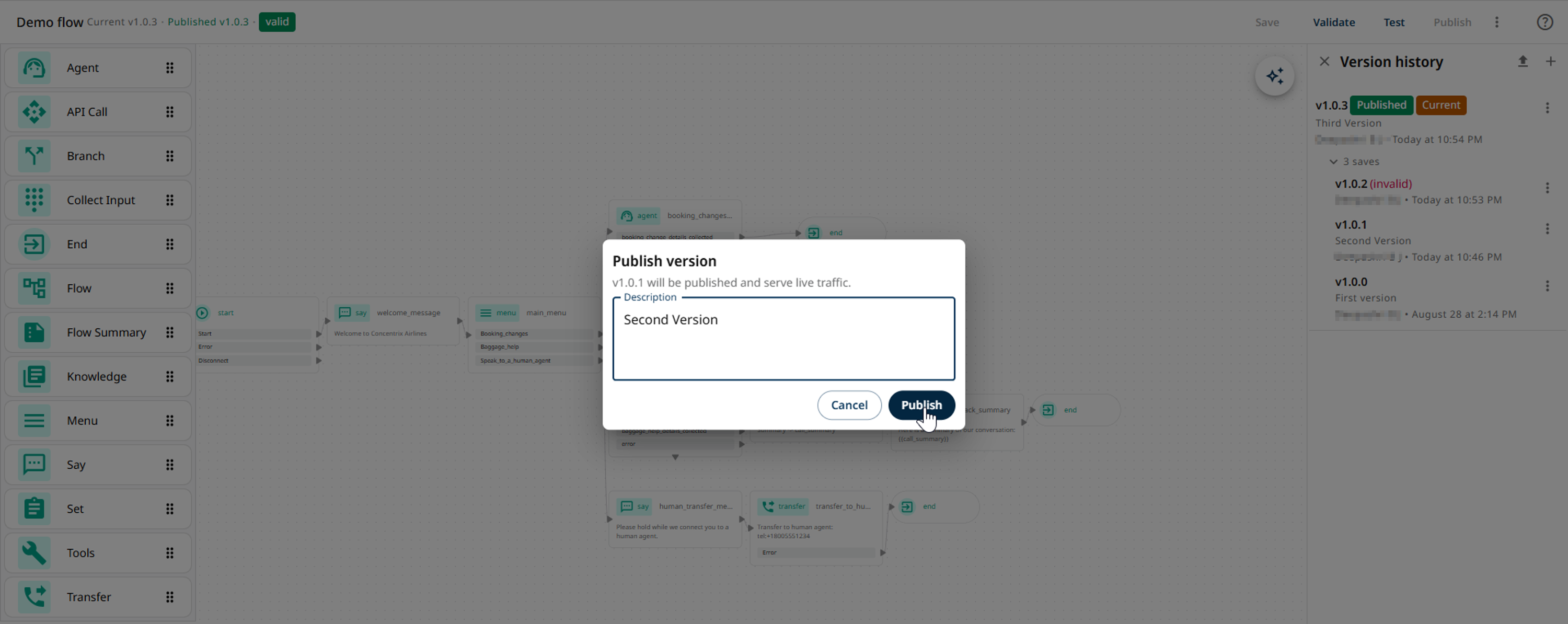
### Step 4: Publish
When testing is complete:
1. Open the flow.
2. Select the desired version.
3. Click Publish.
4. Confirm the action.
The selected version becomes live.
***
## Version History
The Version History page provides visibility into all saved versions.
For each version users can view:
* Version number
* Creation timestamp
* Current status
* Published indicator
* Draft indicator
This helps teams understand the progression of changes.
***
## Comparing Versions
Users can compare versions to understand what changed between releases.
Supported comparisons include:
* Current Draft vs Published Version
* Historical Version vs Published Version
#### Example
You can compare:
* Version 1.0.1 ↔ Published Version 1.0.4
You can also compare:
* Current Draft ↔ Published Version
This helps reviewers validate changes before deployment.
***
## Testing Specific Versions
Version-pinned testing allows users to run a specific flow version without affecting live traffic.
### Supported Scenarios
#### Test Published Version
Validate what customers currently experience.
#### Test Current Draft Version
Validate changes under development.
#### Test Historical Version
Reproduce previous behavior for troubleshooting or analysis.
***
### Example
Published Version: **1.0.2**
Current Draft Version: **1.0.3**
Testers can:
* Execute 1.0.2
* Execute 1.0.3
* Compare behavior
* Publish only after validation
Meanwhile, customers continue using version 1.0.2.
***
## Publishing a Previous Version
A previously saved version can be republished at any time.
This provides a quick recovery mechanism if a newer release introduces issues.
#### Example
Version History:
* 1.0.1
* 1.0.2
* 1.0.3 (Published)
A problem is discovered in 1.0.3.
A publisher can republish version 1.0.2.
Result:
* New sessions immediately use 1.0.2.
* Existing sessions continue using their originally assigned version.
***
## Restore vs Publish
These actions serve different purposes.
| Action | Updates Draft | Updates Live Traffic |
| ------- | ------------- | -------------------- |
| Restore | ✅ Yes | ❌ No |
| Publish | ✅ No | ✅ Yes |
#### Important
Restoring a version only changes the draft.
Publishing changes what customers experience.
***
## Permissions and Roles
### Flow Builder
Users with flows:edit permission can:
* Create flows
* Edit flows
* Save drafts
* Create new versions
* Test versions
They cannot automatically publish changes.
***
### Publisher
Users with flows:publish permission can:
* Publish versions
* Promote releases to production
* Republish older versions
Publishing rights are separate from editing rights.
This allows organizations to implement release approval processes.
***
## What Users See in Designer
### Current and Published Version Indicators
The Designer displays:
* Current Version
* Published Version
This helps users immediately understand:
* What is in production
* What is still in development
***
### Draft Ahead Indicator
If additional changes are saved after publishing:
* The current version moves ahead.
* The Designer shows that the draft is newer than the published version.
This reduces confusion about what customers are currently using.
***
### Multiple Publish Options
Publishing can be performed from:
* The Flow Designer
* Version History
This provides flexibility for release management.
***
## Special Behavior
### Never Published Flows
If a flow has never been published:
* It has no live version.
* Runtime requests will return "Not Found."
* The flow must be published before customers can access it.
***
### Invalid Version Requests
If a requested version does not exist:
* The runtime returns "Not Found."
* The platform does not automatically use another version.
This prevents unexpected behavior.
***
### Concurrent Publishing
If multiple users publish versions at nearly the same time:
* The last successful publish becomes the active version.
* Audit history records the final outcome.
***
### Summary
The Draft & Publish Lifecycle introduces a structured and controlled deployment process for flows. Builders can safely develop and test changes in draft mode, while publishers control when versions become live. With immutable versioning, version history, publish permissions, version-specific testing, and support for republishing earlier releases, organizations gain stronger governance, safer releases, and a more predictable runtime experience.
---
# Agent Instructions
This documentation is published with GitBook. GitBook is the documentation platform designed so that both humans and AI agents can read, navigate, and reason over technical content effectively. Learn more at gitbook.com.
## Querying This Documentation
If you need additional information that is not directly available in this page, you can query the documentation by asking a question.
Perform an HTTP GET request on the following URL with the `ask` and `goal` query parameters:
```
GET https://docs.ixhello.com/ixhc2/draft-and-publish-lifecycle-for-flows.md?ask=&goal=
```
`ask` is the immediate question: it should be specific, self-contained, and written in natural language.
`goal` is what the user is ultimately trying to achieve, the reason they need the answer. Sharing it helps GitBook give you a better, more relevant answer. A goal is most helpful when it describes the outcome the user wants rather than restating the question. For example, with `ask=how do I create an API token`, a goal like `automate deployments from our CI pipeline` lets GitBook tailor the answer to that use case.
The response will contain a direct answer to the question and relevant excerpts and sources from the documentation.
Use this mechanism when the answer is not explicitly present in the current page, you need clarification or additional context, or you want to retrieve related documentation sections.